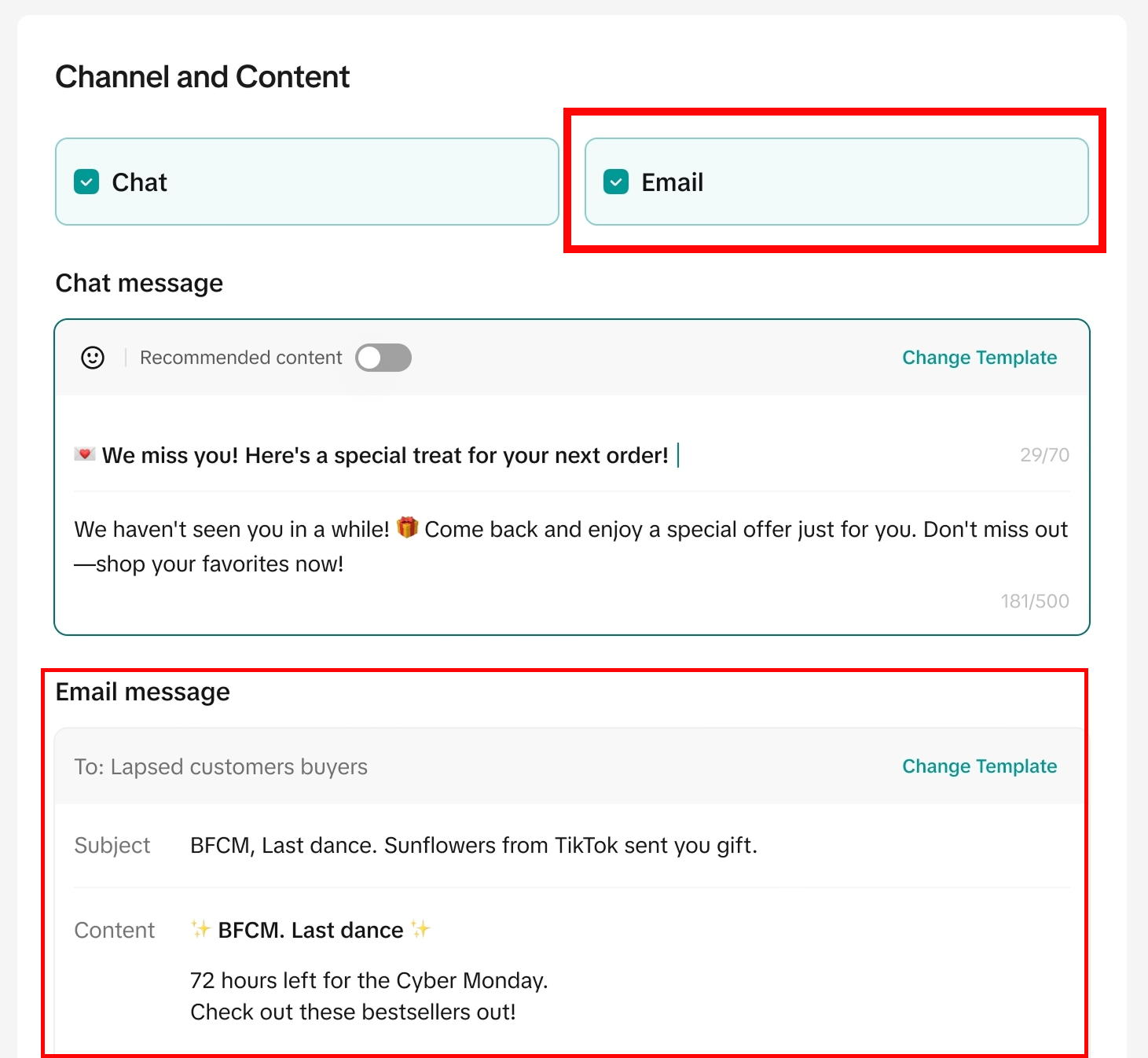
TikTok Shop just added Customer (CRM) email as a new outreach channel inside the TikTok Shop Customers (CRM) tool—meaning you can now communicate at scale beyond the in-app Chat channel with targeted, scenario-based email campaigns.
This post walks through what the new program is, who can access it, how to set it up, and how to run effective email campaigns (with templates, segmentation ideas, and a practical cadence).
What’s New: CRM Email Inside TikTok Shop Seller Center
Until now, TikTok Shop seller communication was more limited, often centered on Chat and reactive customer support. With this launch, email becomes a built-in outreach channel inside TikTok Shop’s CRM workflows, so you can:
Reach more customers through a high-scale channel (email)
Target specific segments (new followers, potential new customers, etc.)
Use email across multiple campaign scenarios (launches, promos, win-back, loyalty)
Build repeatable workflows using pre-built templates or custom plans
In other words: you now have a real CRM-style lever inside TikTok Shop, without needing a separate ESP just to run basic retention or reactivation.
Eligibility: Why It Says “Ineligible” (SPS Requirement)
TikTok Shop is gating CRM email access behind shop performance requirements:
You need a Shop Performance Score (SPS) of at least 3.5
And your shop needs GMV > 0
If you don’t meet that, you may be unable to create, send, or edit outreach plans.
What to do if you’re ineligible right now
If you’re blocked:
Confirm SPS and GMV status in Seller Center.
Focus on raising SPS (common drivers are fulfillment reliability, cancellations, shipping performance, customer experience).
Get to initial GMV with simpler motions first:
Run a starter offer on 1–3 hero SKUs
Use LIVE or affiliate to generate first orders
Ensure shipping/returns experience is clean to protect SPS
Once you cross the threshold, CRM email becomes a powerful retention engine.
Where to Find It in Seller Center
Follow the path TikTok outlined:
Log in to TikTok Shop Seller Center
Navigate to Customers
Open the Outreach tab
Choose:
A one-time plan template, or
Create from scratch
Choose your target audience and select Email as the delivery channel
Understanding the Outreach Templates (What to Use, When)
Inside Outreach, TikTok surfaces pre-built templates that typically map to real lifecycle scenarios. Here’s how to choose the right one based on intent:
One-time plan templates (campaign-style)
Use these when you want a single push tied to a moment:
New product launch
Limited-time promotion
Best-seller spotlight
LIVE announcement
Seasonal sale
Best for: short windows, product drops, inventory moments, “event” marketing.
Automated plan templates (always-on lifecycle)
Use these when you want set-and-forget flows that run continuously:
Welcome new followers
Go LIVE reminders
Recover abandoned carts
Recover incomplete checkouts
Price-drop reminders
Best for: retention, repeat purchase, and reclaiming lost conversion without constant manual work.
Step-by-Step: Create Your First CRM Email Campaign
Step 1: Pick the right objective
Don’t start with “send an email.” Start with what you want the customer to do:
Buy now (conversion)
Come back (reactivation)
Watch LIVE (engagement)
Follow / save / revisit (consideration)
Repeat purchase (retention)
Step 2: Choose your audience segment
TikTok’s notification mentions segments like:
Potential new customers
New followers
Depending on what your CRM tool supports in your account, you may also see segments like recent buyers, engaged users, etc.
Pro tip: If you’re new, pick a segment that naturally performs well:
Warm audience: recent visitors / engaged users / followers
Existing customers: recent purchasers
Cold segments are harder to convert with email alone unless your offer is strong.
Step 3: Select Email as the delivery channel
If email is available (SPS ≥ 3.5 + GMV > 0), you’ll be able to choose Email as the channel inside the workflow.
Step 4: Build the offer + CTA
Email campaigns fail most often because they’re vague. Tie the email to one action:
“Shop the new launch”
“Watch the LIVE at 7pm”
“Finish checkout”
“Come back—limited-time promo”
Step 5: QA like a marketer (not like a seller)
Before sending:
Is the subject line specific?
Is the first line instantly clear?
Is there a single CTA?
Does it render well on mobile?
Are the products linked clearly?
What to Send: 7 High-Performing Email Types for TikTok Shop
Below are campaign types that match the templates TikTok highlights (launches, win-back, loyalty, LIVE, etc.), plus the “why” behind each.
1) Welcome Email (New Followers)
Goal: Convert “interest” into the first purchase.
Send timing: Immediately or within 24 hours.
What it should include:
Quick brand promise (1–2 lines)
1–3 best sellers
Social proof (short)
One clean CTA
2) Best Seller Spotlight
Goal: Reduce choice overload; sell what already sells.
Send timing: Weekly or biweekly.
Works because customers don’t want your whole catalog—they want the obvious best choice.
3) New Product Launch Announcement
Goal: Create urgency + novelty.
Send timing: 24–48 hours before drop + day-of reminder.
Pair with:
short feature bullets
who it’s for
launch incentive (optional)
4) “Go LIVE” Reminder
Goal: Drive attendance and real-time conversion.
Send timing: 2–4 hours before, then 15–30 minutes before LIVE.
Keep it simple:
time
what you’re demonstrating
what deal is live-only
5) Abandoned Cart Recovery
Goal: Reclaim shoppers who were close.
Send timing: 1 hour, 12 hours, 24 hours.
Your best levers:
friction removal (“Checkout takes 30 seconds”)
urgency (“Limited inventory”)
clarity (“Here’s what you left behind”)
6) Incomplete Checkout Recovery
Goal: Similar to abandoned cart, but usually more technical or friction-based.
Send timing: Similar cadence (1 hr / 12 hr / 24 hr).
Focus on reassurance:
shipping expectations
returns clarity
support options
7) Win-Back / Reactivation Campaign
Goal: Bring back lapsed customers.
Send timing: 30 / 60 / 90 days since last purchase (adjust by category).
Win-back works best when it’s personalized:
“Still using [product]?”
“Here’s the next best step”
“Replacement filters / accessories / refills”
Copy That Works: Email Templates You Can Use
Template A: New Product Launch
Subject: New drop: [Product Name] is live!
Body (short):
Hey [Name] we just launched [Product Name]. It’s built for [who it’s for] and helps you [main outcome].
Top features:
[Benefit 1]
[Benefit 2]
[Benefit 3]
CTA: Shop the launch
Template B: Go LIVE Reminder
Subject: We’re going LIVE today at [time]
Body:
We’re demoing [product], answering questions, and sharing [LIVE-only deal or benefit].
Join us at [time] and grab the offer while it’s live.
CTA: Watch the LIVE
Template C: Win-Back
Subject: Want to pick up where you left off?
Body:
It’s been a bit since your last order. If you’re still looking for [outcome], our top pick right now is [product].
Here’s a quick reason why: [1 sentence]
CTA: Come back and shop
Segmentation Ideas That Actually Improve Results
TikTok calls out targeting segments like new followers and potential new customers. Here are practical ways to think about segmentation (even if your available segments vary):
Warm segments (start here)
New followers (last 7–14 days)
Recent purchasers (last 30 days)
Engaged viewers / visitors (last 7–14 days)
Intent-based segments (higher leverage)
Abandoned cart users
Incomplete checkout users
Product viewers (if available)
Lifecycle segments
First-time buyers
Repeat buyers / VIPs
Lapsed customers (no purchase in X days)
Rule of thumb:
If you’re not sure, start with new followers + recent purchasers. They’re the easiest wins.
Cadence: How Often Should You Email TikTok Shop Customers?
You want enough frequency to drive sales without burning trust.
A simple cadence:
1x/week: best seller spotlight OR weekly offer
2–4x/month: launches, promos, LIVE announcements (as needed)
Always-on: cart recovery, incomplete checkout, welcome series
If you’re running heavy promos or LIVE events, email can be more frequent—but keep it relevant and scenario-based.
What to Track (So You Know It’s Working)
TikTok referenced improving open rates and message reads. Inside your CRM dashboard, you’ll likely see metrics like:
Total recipients
Opens / reads
Clicks (if shown)
Orders / GMV attributed (if shown)
Track performance per scenario:
Welcome: conversion to first order
Cart recovery: recovery rate
Live reminder: live attendance + same-day GMV
Win-back: reactivation rate
Most important habit: treat each email as a mini experiment—change one thing at a time (subject line, offer, segment, send timing).
Quick “First 30 Days” Email Plan (Simple + Effective)
If you want a plug-and-play plan:
Week 1
Welcome new followers (automated)
Abandoned cart + incomplete checkout (automated)
Week 2
Best seller spotlight (one-time)
Week 3
Go LIVE reminder (one-time, if you’re going live)
Price-drop reminder (automated, if applicable)
Week 4
Win-back to lapsed customers (one-time)
Then repeat with smarter segmentation and better creative.
Final Takeaway
This CRM email launch is a big deal because it moves TikTok Shop sellers from reactive messaging to real lifecycle marketing—welcome, nurture, recover, win-back, and loyalty—without leaving Seller Center.
If you qualify (SPS ≥ 3.5 and GMV > 0), your next move is simple:
Turn on an automated baseline (welcome + cart recovery)
Layer in one weekly campaign (best seller or LIVE)
Add win-back monthly
That’s how email becomes a sales channel not just another feature.
If you want help sending emails to your TikTok Shop Customers, or any other TikTok Shop Services, reach out to Click Clack Consulting below